

Camera
iPad Price in Bangladesh 2026: কোন iPad কিনবেন? (Air M4, Pro M5, 10th Gen)
২০২৬ সালে বাংলাদেশে iPad এর দাম, কোন মডেল কার জন্য, আর বাজেটে বিকল্প ট্যাবলেট।
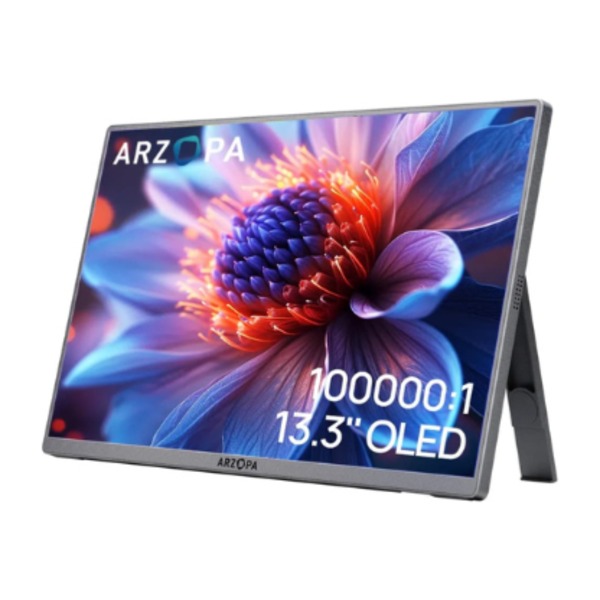
A MacBook is fast, but its 13- or 15-inch screen fills up quickly when you have Xcode, Figma, Excel or a Zoom call open at once. A portable monitor for your MacBook gives you a second screen you can carry in the same bag, and it connects with one USB-C cable. This guide explains how many external screens your MacBook supports, how to set one up in two minutes, and which portable monitors work best with a Mac in Bangladesh.
Yes. Every Apple Silicon MacBook (M1, M2, M3, M4 and M5) has USB-C or Thunderbolt ports that carry video, power and data through one cable. Plug a USB-C portable monitor in and macOS detects it straight away, with no driver or app needed.
One thing to know: macOS does not support touch input on external monitors. A touchscreen portable monitor works perfectly as a display on a Mac, but the touch layer stays inactive. If you only use a Mac, you don’t need to pay extra for touch.
This is the most common question we get at our Bashundhara City store. The answer depends on the chip:
| MacBook | External displays (native) |
|---|---|
| MacBook Air M1 / M2 | 1 |
| MacBook Air M3 | 2 (with the lid closed) |
| MacBook Air M4 / M5 | 2 (with the lid open) |
| MacBook Pro with base M-chip | 1–2, depending on generation |
| MacBook Pro with M Pro chip | Up to 2 |
| MacBook Pro with M Max chip | Up to 4 |
Check Apple’s tech specs page for your exact model before buying a multi-screen setup.
Need more screens on a base MacBook Air? Multi-screen units like the Triple Aero Pro Max may need DisplayLink software on base M-chip Macs to run two extra screens. Ask us before you buy and we’ll confirm it works with your exact MacBook.
If the screen stays black: connect the monitor’s power adapter to its second USB-C port. Some 4K or high-brightness monitors need more power than a MacBook port provides, especially on battery.
macOS is designed for sharp “Retina” screens. On a Full HD (1080p) monitor, text can look slightly soft next to your MacBook’s built-in display. A 2.5K (2560×1600) or 4K monitor looks much closer to Retina quality, so we recommend 2.5K or higher if you spend all day reading or writing on the second screen.
The Arzopa Z1RC has a 16-inch 2.5K (2560×1600) IPS screen with a 16:10 aspect ratio, the same shape as a MacBook display. Its 500 nits brightness keeps it readable next to a window. It’s our most recommended monitor for MacBook Air users.
If you mainly need extra space for email, Slack or a browser, the Arzopa A1 15.6-inch Full HD screen is the lowest-cost way to go dual-screen on your Mac.
The Arzopa Z3FC combines a sharp 2.5K resolution with a 180Hz refresh rate. Scrolling and window movement feel as smooth as a MacBook Pro’s ProMotion display, and it’s great for gaming on a Mac too.
The 13.3-inch OLED Arzopa A3C Pro has deep blacks and an ultra-thin metal body. It pairs perfectly with a 13-inch MacBook Air for travel.
Photographers and video editors working in Final Cut or Lightroom need accurate colour. The Ehomewei R-4K covers 100% DCI-P3, the same colour space as Apple’s displays, with 500 nits brightness.
For traders and analysts who need three screens anywhere, the Triple Aero Pro Max attaches extra screens behind your laptop. Check the display support table above first.
See all portable monitors → · Compare every model in our Best Portable Monitor in Bangladesh 2026 guide.
| Portable monitor | Apple Studio Display | |
|---|---|---|
| Price in Bangladesh | ৳13,000–40,000 | Far higher |
| Portability | Fits in your laptop bag | Desk only |
| Setup | One USB-C cable | One Thunderbolt cable |
| Best for | Travel, office, home, students | Fixed professional desk |
For most MacBook users in Bangladesh, a 2.5K portable monitor gives most of the benefit at a fraction of the price, and you can take it to the office, a client meeting or home.
MacBook users often want a specific USB-C monitor, dock or hub that is only sold in the USA. With our Amazon USA pre-order service, you send the product link and pay in Taka. Planning to buy the Mac itself from the USA too? See our USA Apple price guide for Bangladesh.
Want to know the cost first? Read our guide to Amazon to Bangladesh shipping cost and customs duty, or compare 3 ways to buy from Amazon USA in Bangladesh.
Can I use a portable monitor with a MacBook Air? Yes. Any USB-C portable monitor works with MacBook Air through one cable. M1 and M2 Air support one external display; M3, M4 and M5 Air support two.
Do touchscreen portable monitors work on a Mac? The screen works as a normal display, but macOS doesn’t support touch on external monitors.
Which portable monitor is best for MacBook in Bangladesh? The Arzopa Z1RC 2.5K (৳17,500) is the best value because its 16:10, 2.5K screen matches MacBook displays. On a budget, choose the Arzopa A1 (৳13,000).
Does a portable monitor drain my MacBook battery? Yes, slightly, because the monitor draws power over USB-C. On long sessions, plug in the monitor’s own adapter or keep your MacBook charging.
Can I connect two portable monitors to a MacBook Air M1? Not natively, because M1 and M2 Air support one external display. You can add more screens with a DisplayLink adapter or dock.
ম্যাকবুকে কি পোর্টেবল মনিটর লাগানো যায়? হ্যাঁ, একটি USB-C ক্যাবল দিয়েই লাগানো যায়। কোনো ড্রাইভার লাগে না। তবে ম্যাকে টাচ ফিচার কাজ করে না।
ম্যাকবুকের জন্য কোন পোর্টেবল মনিটর ভালো? Arzopa Z1RC 2.5K (৳১৭,৫০০) সবচেয়ে ভালো, কারণ এর ২.৫কে স্ক্রিন ম্যাকবুকের ডিসপ্লের মতোই শার্প।
Not sure which monitor fits your MacBook? WhatsApp 01333388502 with your model, and we’ll recommend the right one.
আরও পড়ুন: MacBook Air M4 vs M5: কোনটা কিনবেন · iPad Price in Bangladesh 2026: কোন iPad কিনবেন
২০২৬ সালে বাংলাদেশে iPad এর দাম, কোন মডেল কার জন্য, আর বাজেটে বিকল্প ট্যাবলেট।
MacBook Air M4 না M5? বাংলাদেশে দাম, স্পেক পার্থক্য, EMI আর কার জন্য কোনটা, এক জায়গায়।

Walmart doesn’t deliver most orders to Bangladesh. Here is how to buy from Walmart.com, which brands you can get, and how to pay in Taka with delivery in 12–24 working days.

Shop Smarter, Source Anything: The Future of Shopping is Here! We Source The Products That You Want.
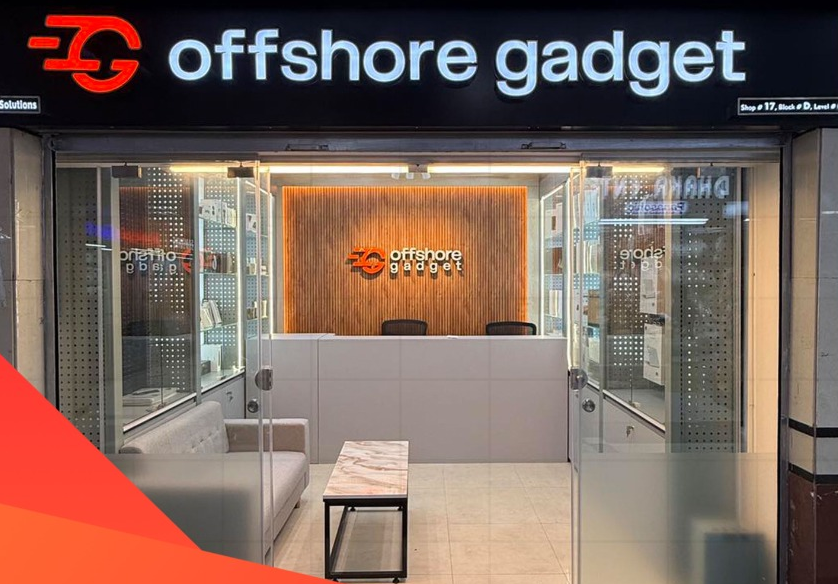
Opening Hours: 11:00 AM – 08:00 PM (Wed – Mon)